Eye contact, AI tracking, 180 degrees: four webcams for calls and streaming
Webcams under €350
Every video call shows two things: your face, and where the webcam is pointing. Almost all desk webcams clip to the top edge of a monitor, so the picture looks slightly down at you while your eyes stay on the screen below. Nobody on the call ever sees you look at them.
That small problem of geometry explains the four webcams compared here. Two of these webcams hang a tiny lens on a folding arm in front of the screen, at eye level. One webcam is a motorised head that pans and tilts to follow you around the room. The fourth webcam gives up on framing one person and opens the lens to 180 degrees, so a whole meeting table fits into the picture.
All four webcams promise 4K, all four carry dual noise-cancelling microphones, and all four plug in over USB without a driver. In most stores each one stays under $380, and the group sits near $215, so this is not a comparison of budget classes. What separates these webcams is where the lens sits, how it frames you, and whether the 4K printed on the box survives the trip into Zoom. Specifications come from the listings, opinions from buyers who paid for these webcams, and the per-store prices sit in the cards.
Models in this comparison
Typical price across these models: about €213. Rough figures from store prices converted at fixed rates: what you pay also depends on the store and the region you order from. With our browser extension you can compare every Amazon store at once, right on the product page.
iContact ProHello, the eye contact webcam with Windows Hello
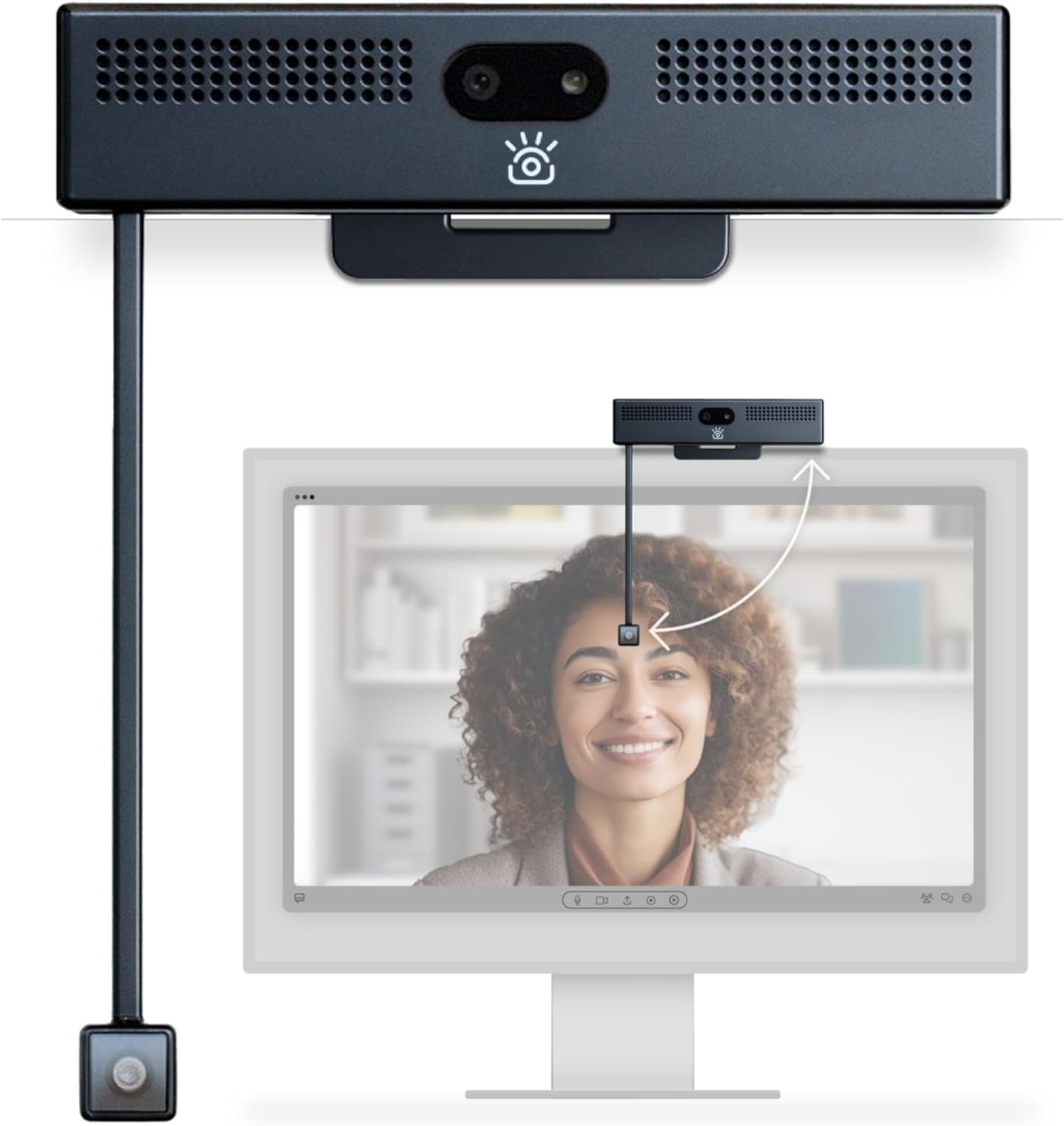
iContact Camera ProHello 4K HD Webcam with Eye Contact Function and Windows Hello
ASIN: B0FND8ZVXM
- ✓Retractable 108 mm arm places the lens at eye level in front of the screen
- ✓Windows Hello face login, a fingerprint sensor and Linux Howdy support
- ✓Raising the arm cuts power to camera and microphone with the Secure Switch
- ✓12 MP 4K sensor at 30 fps, dual noise-cancelling microphones, USB-C
- Video resolution
- 4K, 3840 pixels, 30 fps
- Still resolution
- 12 MP
- Field of view
- 78 degrees
- Aperture
- f/2.5, focal length 3.6 mm
- Arm length
- 108 mm, for monitors up to 32 inches
- Connection
- USB-C, no driver needed
- Model
- iContact Camera ProHello, ICCPH01
The ProHello is a normal-looking webcam bar on top of the monitor with one extra trick: a 108 mm arm that swings down over the screen and parks a second lens roughly where the other person's face appears. You look at them, and the webcam looks back from the same spot. Flick the arm up again and the Secure Switch cuts power to both the lens and the microphones, which is a firmer privacy promise than a software toggle. The same housing holds a fingerprint reader and supports Windows Hello, so this webcam also unlocks the computer without a password, and Linux users get the same through Howdy.
The rest of the webcam is ordinary in a good way. It records 4K at 30 frames a second from a 12 MP sensor across a 78-degree view, which is tight enough to show one person and not the whole kitchen. Two microphones handle voice. The connection is USB-C with no driver, and a free application for Mac and Windows adjusts brightness, contrast, tone and field of view, and can lay graphics over the picture for a live stream. The maker states the arm suits monitors up to 32 inches; on anything larger, the arm no longer reaches a sensible height.
Buyer reports split along a clear line, and the line runs between the two lenses. A remote worker who spent a month with this webcam kept it, called the picture the equal of the 4K model it replaced, and stopped noticing the arm within a week. A therapist working one to one over video said the eye-level view made conversations feel closer and accepted a softer picture in exchange. Against them stand three angry reviews, and they agree with each other: the top lens is sharp, the eye-level lens is not. One buyer said the small lens is nowhere near 4K and returned the webcam for that reason alone, another found the webcam useless in a dimly lit room, a third could not get the application to run and sent it back within the hour.
Pros
- The eye-level lens genuinely changes how a conversation feels
- The arm folds up in a second, and folding it cuts power to lens and microphones
- Face and fingerprint login on Windows, with Linux supported through Howdy
- Picture from the upper lens matches established 4K models, by one owner's account
- Plugs in over USB-C and works without a driver
Cons
- The eye-level lens is visibly softer than the upper one and than the 4K badge suggests
- Weak in a low-light room
- The control application failed or crashed for several owners
- The arm only fits monitors up to 32 inches
- The listing does not make the two different lenses obvious
This webcam suits somebody whose day is one meeting after another, who is judged on presence rather than picture detail, and who has a bright desk. Anyone who films in a dark room, or who needs the sharpest possible image for a stream, should look at the other webcams below.
iContact ProXL, a longer webcam arm for a wider monitor
The ProXL webcam is the same idea, stretched. Its arm measures 133 mm, a quarter longer than on the standard iContact model, and the maker aims this webcam at monitors above 35 inches and at multi-screen desks where the middle of the picture is far from the top bezel. Everything else repeats: the 12 MP 4K sensor at 30 fps, the same 78-degree view, the stereo microphone pair, USB-C without drivers, Zoom certification, and the same application for colour, sharpness and overlays.
Owners are cooler about this webcam than about the ProHello, and their objections are specific rather than general. A buyer with a large monitor kept the webcam but listed four problems: motion smears and trails behind when he gestures, the picture can zoom in but not back out, autofocus is switched off, and his voice thinned out as soon as he sat further back — he ended up buying a clip-on microphone. He also found out the hard way that the plug is USB-C 3.2, which the listing never spells out. Another owner returned to an old Logitech after the sound quality and a daily application crash wore him down. Two shorter reviews call the resolution noticeably low. The praise, where it comes, is for the concept: eye contact on a video call feels natural in a way top-mounted webcams cannot copy.
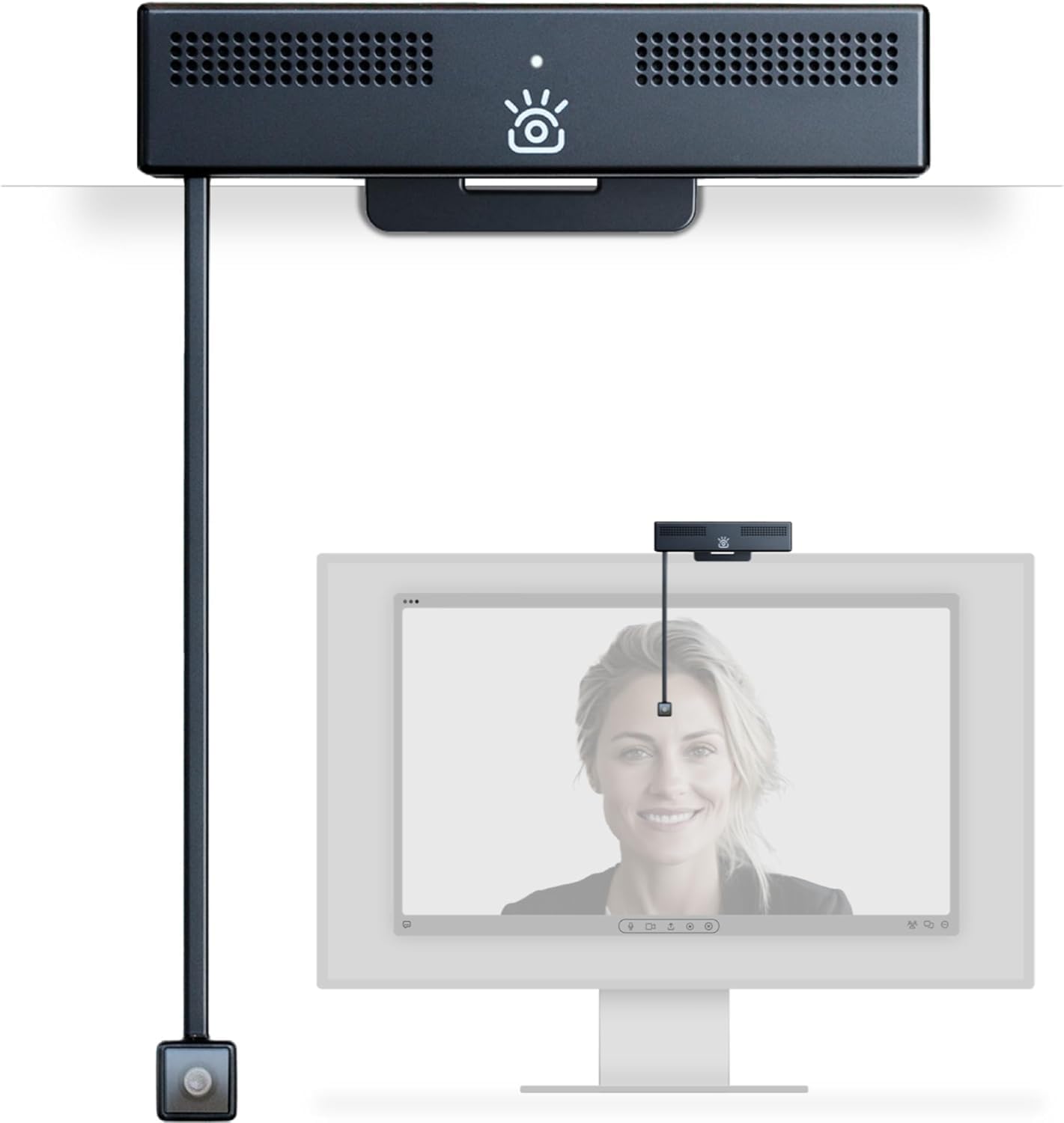
iContact Camera ProXL 4K HD Webcam with Noise Cancelling Microphone, USB Camera for Monitor
ASIN: B0FNDD8XMD
- ✓133 mm arm, a quarter longer than the standard iContact model
- ✓Built for monitors above 35 inches and for multi-screen desks
- ✓12 MP 4K sensor at 30 fps behind a 78-degree lens
- ✓Works on Windows, macOS, Chrome OS and Linux with no driver
- Video resolution
- 4K, 2160 pixels, 30 fps
- Still resolution
- 12 MP
- Field of view
- 78 degrees
- Focal length
- 3.5 mm
- Arm length
- 133 mm, for monitors above 35 inches
- Connection
- USB-C
- Model
- iContact Camera ProXL, ICCP01S
Pros
- The 133 mm arm reaches eye level on monitors a shorter arm cannot cover
- Eye contact on a video call feels natural, in the words of buyers who kept it
- Same 12 MP sensor, 78-degree lens and driver-free USB as the shorter model
- Compact enough to fold away when the screen is needed in full
Cons
- Owners call the resolution noticeably low for a 4K webcam
- Motion smears and trails behind when you gesture with your hands
- The picture zooms in but never back out, and autofocus is switched off
- Voice thins out as soon as you sit back, so a separate microphone may be needed
- The control application crashed daily for one owner and had to be reset
This webcam is for a wide or multi-screen desk where a shorter arm would park the lens too high. Anyone sitting more than an arm's length back, or filming hands in motion, will run into its two weak points at once.
MT-VIKI MT-LWC1, the webcam with AI tracking
The MT-VIKI webcam takes the opposite route. Instead of moving the lens closer to your eyes, this webcam moves the lens after you. A brushless motor turns the head through 330 degrees and tilts it through 180, quietly enough that the microphones do not pick it up, and an AI tracking mode locks onto a person and keeps them centred. You start tracking by holding up an OK sign, and zoom in or out with a hand gesture, which matters when the webcam is across the room and the keyboard is not. Six positions can be stored and recalled instantly from the bundled radio remote, and there is a standard tripod thread underneath for a stand.
The imaging side of this webcam is the strongest on paper here. A 1/2.8-inch CMOS sensor records 4K at 30 fps or Full HD at 60 fps, and the 60 fps mode is the reason presenters like this webcam: movement looks natural rather than stuttered. HDR pulls back blown windows and lifts shadows, the 92-degree lens is wide enough for two or three people at a desk, and a time-of-flight rangefinder claims focus in 0.2 seconds. One inconsistency belongs on the record: the listing headline says 1080p while the bullet points below promise 4K, and the specification table sides with 4K.
Only three buyers have rated this webcam so far, so read the score as a signal and not as proof. All three are German owners, and all three describe the same things: setup that needs no software, sharp images in native 4K, HDR that copes with awkward light, and the fluid look of 60 fps during presentations. Two of them single out the presets and the remote — recall a stored angle with one button — and one calls the autofocus fast and steady while he moves. Nobody has yet reported a fault, but with three ratings behind it, this webcam carries more unknowns than the rest.
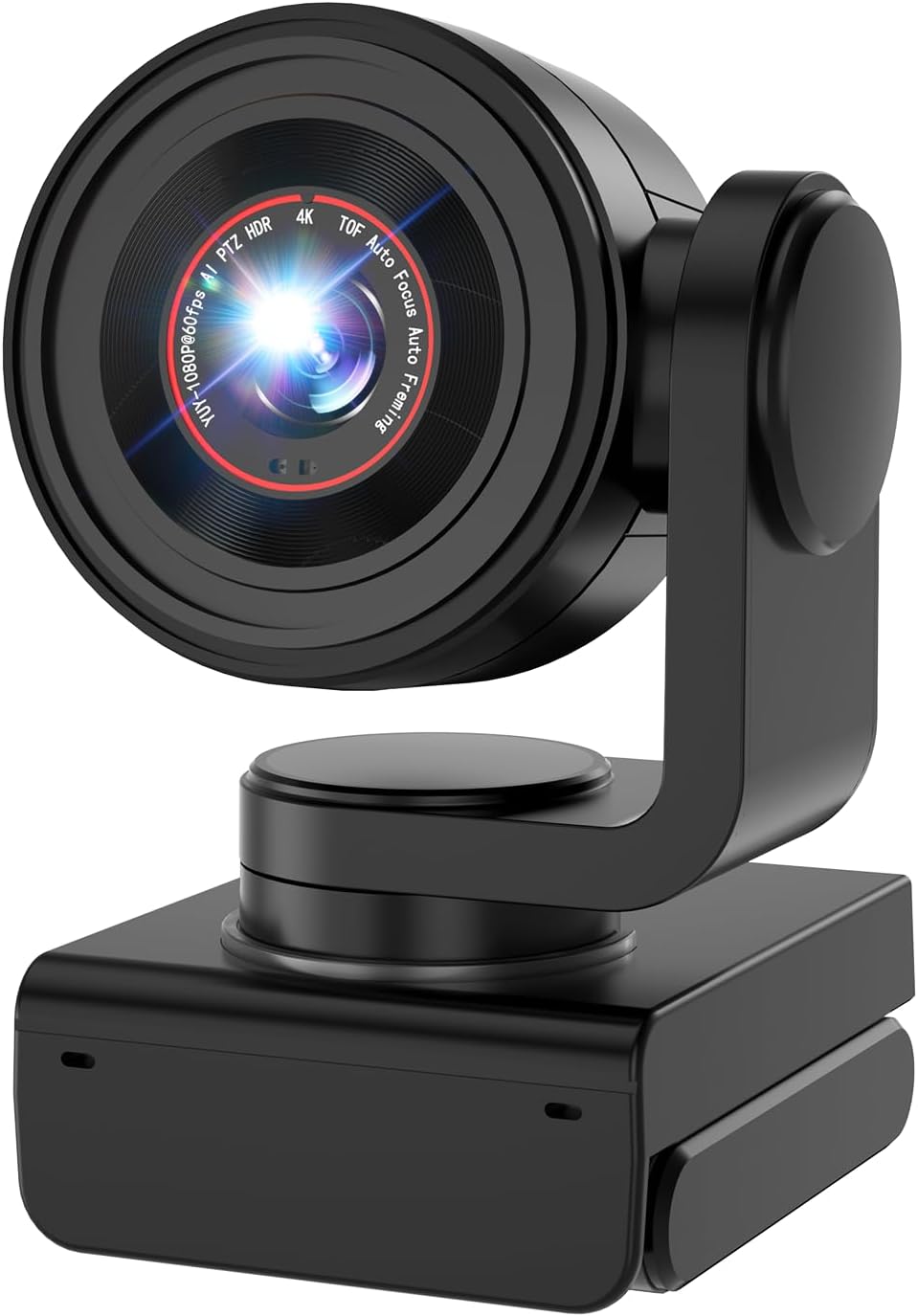
MT-VIKI Webcam 1080P 100FPS 60PFS Full HD Webcam with AI Auto Tracking, 1/2.8 CMOS, HDR
ASIN: B0F99D17MX
- ✓Motorised head pans 330 degrees and tilts 180 degrees, with six saved presets
- ✓AI tracking started by an OK gesture, zoom by hand movement, plus a radio remote
- ✓4K at 30 fps or Full HD at 60 fps, with HDR for mixed light
- ✓Autofocus in 0.2 seconds via a time-of-flight sensor, tripod thread underneath
- Sensor
- 1/2.8-inch CMOS
- Video resolution
- 4K at 30 fps, Full HD at 60 fps
- Field of view
- 92 degrees
- Aperture
- f/2.2, focal length 10-26 mm
- Movement
- 330 degrees pan, 180 degrees tilt
- Formats
- MJPEG, H.264, H.265, YUY2
- Connection
- USB-C 3.1, no driver needed
Pros
- Owners describe sharp native 4K and HDR that copes with hard light
- Full HD at 60 fps keeps movement smooth during a presentation
- Plug and play: it worked with no extra software for every buyer so far
- Stored positions recalled with one button on the remote
- Autofocus stays locked while the owner moves, by one owner's account
Cons
- Only three ratings so far, so nothing is known about long-term faults
- The listing headline says 1080p while the bullets and the table say 4K
- A motorised head is one more moving part than the fixed webcams here
- Gesture control needs learning before it becomes quicker than the remote
A moving lens suits anyone who teaches, presents or steps away from the desk mid-sentence. Somebody who sits still in front of one screen pays for a motor that never turns.
Innex C831, a conference room webcam for a whole table
The Innex C831 is not a personal webcam at all, and that is the point. Its lens opens to 180 degrees, and a button on the body steps the view down through 150, 120, 90 and 75 degrees, so the same webcam serves a six-person table and a one-person office. AI framing tracks several faces at once and can rearrange them into a layout of head-and-shoulder crops, which is how a wide panorama stays readable on a laptop screen. This webcam also adds a 5x digital zoom, automatic light compensation, a dual microphone with noise reduction, a wall mount in the box and a three-year warranty — the longest cover of these four webcams.
Forty-five ratings put this webcam at four stars, and the recent ones are warm. A buyer in the United States calls the video clear and the setup easy, and singles out the 180-degree view. A European owner who sets the webcam at the head of a conference table says it captures everybody around it, and rates it above a 360-degree camera that cost more than twice as much; the layout modes in the application are what won him over. A third review is short and positive about picture quality. What nobody reports is close-up detail for a single talking head, which is the trade 180-degree webcams always make: spread the same 4K across a room and each face gets fewer pixels.
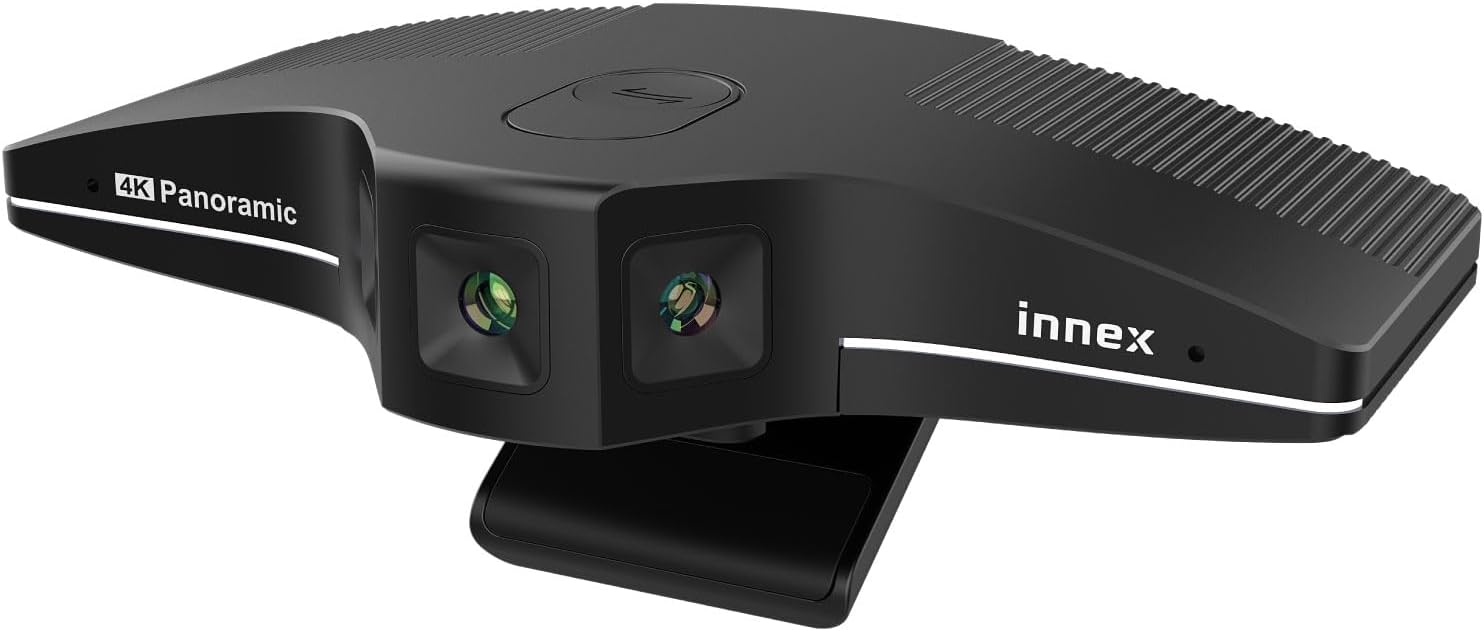
Innex C831 AI-equipped 4K Auto Face Tracking, Auto Framing, 5x Digital Zoom, 180 Degree Web Camera
ASIN: B0DJBJ8NND
- ✓Field of view switches between 180, 150, 120, 90 and 75 degrees with one button
- ✓AI framing follows several faces at once and can crop them into a layout
- ✓Automatic light compensation and a dual noise-cancelling microphone
- ✓Three-year warranty, wall mount and USB cable included
- Video resolution
- 4K, 2160 pixels
- Still resolution
- 12 MP
- Field of view
- 180 degrees, switchable to 75
- Aperture
- f/2.2, focal length from 2.75 mm
- Zoom
- 5x digital
- Size and weight
- 14.6 x 7.4 x 3.3 cm, 240 g
- Warranty
- 3 years
Pros
- One button steps the view from 180 degrees down to 75
- Owners say it captures everybody around a conference table
- Layout modes crop several faces into one readable picture
- Rated above a 360-degree camera that cost more than twice as much, by one buyer
- Three-year warranty and a wall mount in the box
Cons
- A room lens spreads the same 4K thinly, so a single face gets fewer pixels
- The framing layouts depend on the application, not on the webcam itself
- Digital zoom only, with no motor to point the lens somewhere else
- The priciest of these webcams in every store
This is the webcam for a table of people rather than a chair. As a portrait camera for one person on a desk it is the weakest choice here, and the widest setting is the reason why.
Webcam comparison by the numbers
Put the key figures in one place and each webcam takes on a character.
| Parameter | iContact ProHello | iContact ProXL | MT-VIKI MT-LWC1 | Innex C831 |
|---|---|---|---|---|
| Video resolution | 4K, 30 fps | 4K, 30 fps | 4K 30 fps / Full HD 60 fps | 4K |
| Field of view | 78 degrees | 78 degrees | 92 degrees | 180 to 75 degrees |
| Aperture | f/2.5 | — | f/2.2 | f/2.2 |
| Framing | Fixed | Fixed, zoom in only | Motorised, AI tracking | AI multi-face framing |
| Position | Arm at eye level, 108 mm | Arm at eye level, 133 mm | On the desk or a tripod | On the desk or a wall |
| Login by face | Windows Hello, fingerprint, Howdy | — | — | — |
| Remote control | — | — | Radio remote, six presets | Buttons on the body |
| Warranty | — | — | Lifetime technical support | 3 years |
| Customer rating | 3.3 (36) | 3.1 (13) | 5 (3) | 4 (45) |
Read across the rows and the split is not about resolution, since all four webcams here claim 4K. It is about what the webcams do with those pixels. The two iContact webcams spend them on one face at conversational distance and add a login sensor nobody else offers. The MT-VIKI spends them on movement, with the only 60 fps mode and the only motorised head. The Innex spreads them over a room and accepts softer faces in return.
What buyers report about these webcams
One complaint runs through the reviews of both eye-level webcams and deserves the most weight: the picture from the small lens is softer than the 4K label leads people to expect. Owners of the ProHello and the ProXL say it separately, and one of them measured the difference against the top lens on the same webcam. If image sharpness is the reason you are shopping, these are the webcams to be careful with.
The second recurring theme is software. The iContact control application crashed daily for one owner and refused to work at all for another, and since the application is where brightness, colour and field of view live, a broken application takes real features with it. MT-VIKI owners had the opposite experience, describing webcams that worked from the first plug with no software at all.
Audio is the third theme, and it depends on distance. A ProXL owner said his voice thinned out as soon as he sat back from the desk, and bought a separate microphone. The webcams built for rooms rather than desks claim the longer reach: the MT-VIKI is rated for clear voice up to five metres, and the Innex pairs its wide lens with noise reduction for a table of people.
How to choose a webcam for your desk
Start with the distance. Webcams that live 60 cm from your face and webcams that watch a table need different lenses. A 78 to 92-degree view is right for one person; anything approaching 180 degrees is a room webcam, and room webcams make poor portraits.
Decide whether eye contact is worth softer pixels. The eye-level arm is a real advantage in one-to-one calls, and buyers who value connection over detail keep these webcams. Buyers who value detail send them back. Both groups are being honest.
Check the framing you get. Fixed framing is fine if you sit still. If you present, teach or move around, webcams with a motorised head, tracking and stored positions save the fiddling — and a remote control saves it again when webcams sit out of arm's reach.
Read the frame rate, not only the resolution. Every listing leads with 4K. At 30 fps, 4K looks detailed and slightly stuttery in motion, while Full HD at 60 fps looks smooth. For a talking head, 30 fps is enough. For hands, whiteboards or anything moving, 60 fps is the better half of that trade, and a webcam for streaming is judged on exactly that.
Look at what depends on an application. If colour, field of view and overlays live in software, a crash costs you those features. Anything webcams do on their own — a physical view-angle button, a switch that cuts power to the lens, a remote — keeps working whatever the software does.
Count the ratings, not only the stars. Two webcams, one with five stars from three buyers and one with four stars from forty-five, carry very different amounts of evidence. A high average on a handful of votes tells you almost nothing about how a webcam behaves after a year.
Frequently asked questions
- Do webcams on an arm block part of the screen?
- Yes, a small part. The arm hangs the lens over the middle of the display, so a window sitting behind it has to be moved or resized. Owners say they stop noticing within a week, and the arm folds up in a second when the webcam is in the way.
- Is 4K on a webcam worth it for video calls?
- For the call itself, rarely: Zoom, Teams and Meet compress the picture heavily, so good Full HD webcams often arrive looking the same. 4K webcams help with recording, streaming and digital zoom, where nothing is compressed on the way.
- Do these webcams need drivers or software?
- No. All four webcams connect over USB and are recognised as standard cameras. The iContact models offer an optional application for colour, sharpness and overlays; the MT-VIKI is controlled by gestures and its remote.
- Can a webcam log me into Windows?
- Only if the webcam supports Windows Hello. Of these four, the ProHello does, and it also has a fingerprint sensor and works with Howdy on Linux. The other webcams take video only.
- Which webcam suits a meeting room rather than a desk?
- The Innex C831. Its lens covers 180 degrees, the field of view steps down to 75 degrees with a button, and AI framing tracks several faces at once. The MT-VIKI also works for a small room thanks to its motorised head.
- How much does a privacy switch matter?
- It is the difference between trusting software and cutting power. On the ProHello webcam, raising the arm disconnects the lens and the microphones, so nothing can be recorded while the arm is up.
Verdict
Every model on the same criteria
Score against price
- iContact ProHello3.4 at about €199
- iContact ProXL3.0 at about €199
- MT-VIKI MT-LWC14.2 at about €109
- Innex C8314.1 at about €345
The overall score divided by the typical price, with the best in the group as the full bar. A rough guide, not a verdict — a cheap model that misses the feature you need is no bargain.
Read the bars as trade-offs, not as a ranking, because no bar here measures the same job. The two eye-level webcams score lowest on image quality and highest on the one thing no other webcam on this list does at all, and their owners split into people who accepted that trade and people who returned the box. The motorised webcam looks strongest across the criteria, yet its score rests on three votes, while the room webcam carries forty-five and a three-year warranty behind a lens that was never meant to flatter one face.
So the job decides, and the numbers only confirm it afterwards. Ask how far you sit from the lens, how many people share the frame, and whether you move while you talk. Two of those three answers rule out half of this list on their own, and only then is it worth comparing what each store charges.