75% or full-size? Four hot-swap mechanical keyboards compared
Mechanical keyboards under €100
Ten years ago a mechanical keyboard meant a heavy black slab with a Cherry switch under every cap and a price that put most people off. That market has turned over completely. A compact keyboard with hot-swap sockets, a metal knob, five layers of foam inside the case and three ways to connect now costs less than a decent office chair, and dozens of brands build such keyboards.
What has not changed is how hard the listings are to read. Almost every mechanical keyboard on Amazon promises a creamy sound, a gasket structure and 16.8 million colours. The words repeat; the keyboards do not. One keyboard has switches lubricated at the factory and legends you cannot see in the dark. Another is wired only, weighs nearly a kilo and asks for half as much. A third carries a battery twice the size of its rivals and software that hides somewhere on the maker's website.
This mechanical keyboard comparison lines up four of them: the YUNZII B75 PRO, the Ajazz AK820 MAX, the wired full-size nacodex AK35I V3 and the AULA F75 PRO. All four sit in the same class — in most stores each one stays under $100, and the group sits near $87 — so the question is not what you can afford but what these keyboards do differently. Every number below comes from the product listings, and every opinion comes from people who bought these keyboards and wrote about them afterwards.
Models in this comparison
Typical price across these models: about €81. Rough figures from store prices converted at fixed rates: what you pay also depends on the store and the region you order from. With our browser extension you can compare every Amazon store at once, right on the product page.
YUNZII B75 PRO — the hot-swap mechanical keyboard built for sound
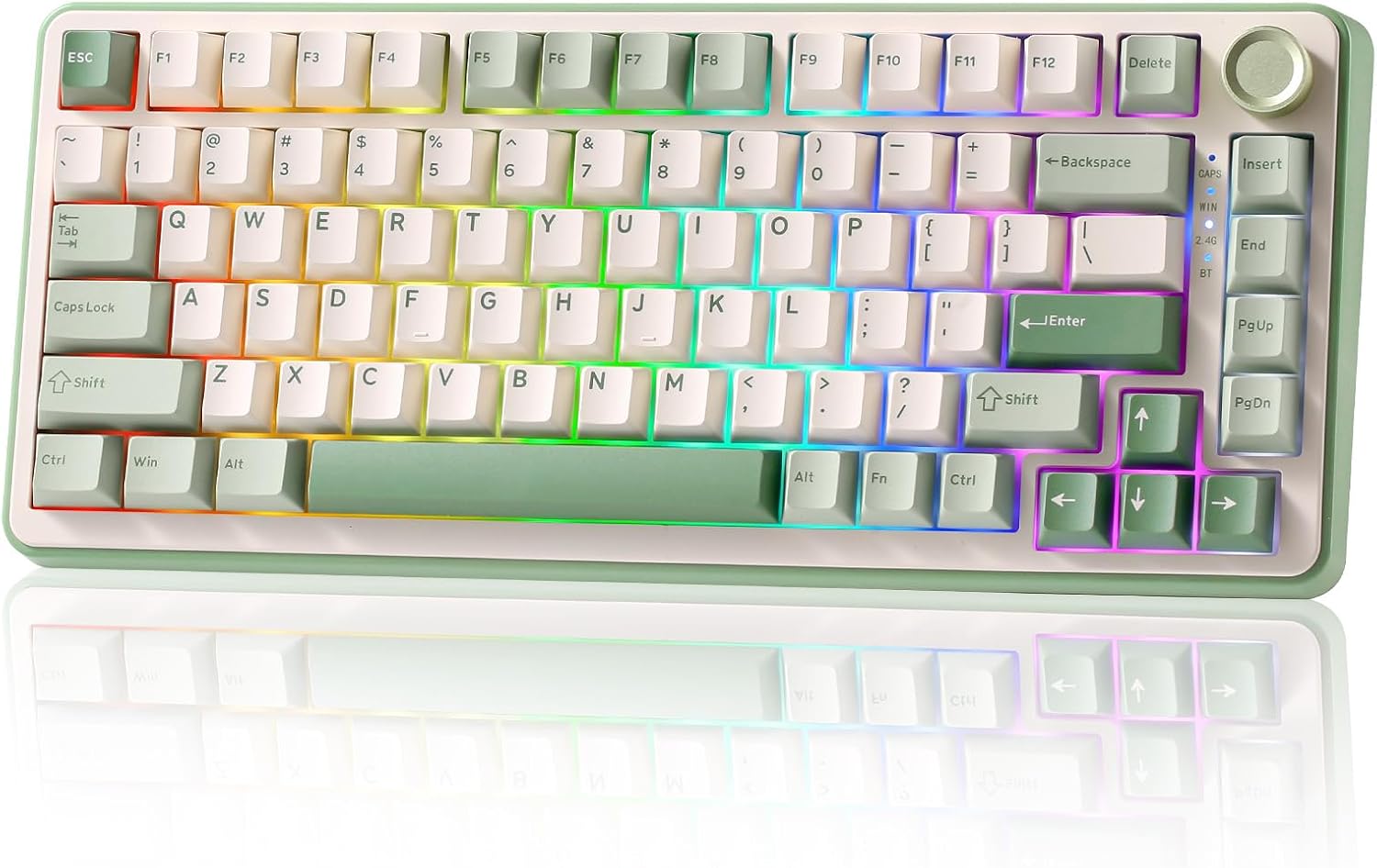
YUNZII B75 PRO Mechanische Tastatur, 75% Gaming Tastatur, Hot Swap, BT/Type-C/2.4G
ASIN: B0FF9WN7R1
- ✓Gasket build with five damping layers for a soft, deep typing sound
- ✓Hot-swap sockets accept 3-pin and 5-pin switches without soldering
- ✓Knob sets the volume and switches between game mode and office mode
- ✓Bluetooth, 2.4 GHz and USB-C, with a 4000 mAh battery behind them
- ✓Spare keycaps, spare switches, a puller and a dust cover in the box
- Layout
- 75%, 82 keys, QWERTY
- Switches
- Cocoa Cream V2, pre-lubricated
- Connections
- Bluetooth, 2.4 GHz, USB-C
- Battery
- 4000 mAh
- Backlight
- RGB, south-facing LEDs, 20+ modes
- Weight
- 0.9 kg
- Warranty
- 12 months
The B75 PRO uses the 75% keyboard layout: 82 keys, the arrow cluster and the function row kept, the number pad dropped. That shape frees a hand's width of desk on the right, which is why so many keyboards now come in it. YUNZII builds the case around a gasket mount, so the plate rests on soft supports instead of screwing straight to the shell, and fills the remaining gaps with five layers of damping. Double-shot keycaps, tuned stabilisers and switches lubricated before assembly finish the recipe.
Everything else is convenience. The knob adjusts volume in one mode and the backlight in the other, and a long press moves between the two. Three connection types are built in — Bluetooth, a 2.4 GHz dongle and a plain USB-C cable — and a 4000 mAh cell keeps the wireless side going. The sockets are hot-swap for both 3-pin and 5-pin switches, so the feel of this keyboard is not fixed at purchase. YUNZII also packs spare keycaps, spare switches, a puller and a dust cover, which is more than most keyboards include.
The praise is consistent, and almost always about sound. Buyers of this keyboard in Germany, Italy, the United States and Canada describe the same thing: a soft, weighted, "creamy" note that makes typing enjoyable rather than merely quiet. One German owner who came from Corsair keyboards says this one is far better. A first-time buyer in Canada compares the sound to an ASMR recording. Several mention the build — the weight, the packaging, the tilt stand — and say the wireless link works without any lag they can notice.
Three complaints repeat, and they matter before you order. The first is the backlight. The keycaps are not translucent, so the legends stay dark, while the LEDs between the keys shine straight into your eyes without a diffuser. One buyer calls this the single major drawback of an otherwise excellent keyboard; another says the colours look nothing like the promised 16.8 million. The second is the software: it works, but it is basic, and there is no Linux version. The third is noise. Owners who love the sound warn that other people in the room may not, and the case is awkward to open.
Pros
- Deep, soft typing sound that buyers single out again and again
- Solid build and a weight that keeps the keyboard still on the desk
- Bluetooth, 2.4 GHz and cable, all switching without a noticeable delay
- Spare switches and keycaps included, so experiments cost nothing
- Knob doubles as a volume dial and a lighting control
Cons
- Legends are not backlit, so the caps are unreadable in a dark room
- Light escaping between the keys is bright and glares
- Configuration software is simple, and Linux is not supported
- Loud enough to bother the person next to you
- Case is hard to take apart for further modification
This keyboard suits someone who types all day, cares how it sounds, and works in a lit room or knows the layout by touch. Anyone who hunts for keys in the dark, needs a number pad, or shares a small office should read on.
What actually makes a mechanical keyboard sound good
The listings for all four keyboards repeat the same three terms, and they do mean something. A gasket mount keyboard carries the switch plate on soft strips instead of bolting it to the case, which takes the sharpness out of every keystroke. Damping layers — foam, PORON, IXPE pads under the switches, a PET sheet — fill the air gaps where the hollow, plastic echo is born. Pre-lubricated switches and stabilisers remove the scratch you feel on a dry stem and the rattle of a long key such as the space bar.
Together they explain why a budget mechanical keyboard bought today can sound better than an expensive one from a few years ago. They also explain the one honest gap between these four keyboards. The owner of the wired nacodex keyboard found its switches dry from the factory, pulled them out through the hot-swap sockets and lubricated them himself. After that, he writes, everything ran smoothly. Hot-swap turns a fixed flaw into an afternoon of work — but only if you are willing to do it.
Ajazz AK820 MAX — the wireless mechanical keyboard with the biggest battery
This keyboard is the closest rival in shape and the boldest on paper. The AK820 MAX keeps the 82-key 75% layout, the gasket structure with five sound-insulating layers and the metal media knob, then doubles the power reserve to 8000 mAh — the largest cell among these keyboards by a wide margin. The keycaps are PBT, which resists shine and finger oil better than ABS, the sockets take 3-pin and 5-pin switches, and the keyboard arrives in a German QWERTZ layout, which the other wireless keyboards here do not offer. Lighting runs to 16 effects with macros and profiles on top.
Buyers are mostly happy and plain about why: the price is low, the sound is pleasant, the switches come out easily, the knob is precise and the keyboard works over cable, dongle or Bluetooth. One reviewer praises it exactly for what it lacks — no loud gamer styling, just an ISO-DE keyboard that does its job. This is the case where the cheapest keyboard of the four beats the rest on a real specification rather than a marketing line.
The warnings are real too. Two owners struggled to find the right software, because the maker's site lists many AK820 variants and only one file matches your keyboard; one of them says it does not reliably save what you set. The single low score in the group belongs to this keyboard: that buyer found loose, cheap-feeling keycaps, dry stabilisers, a knob with a sharp edge and a keyboard that cut out during testing, and sent it back. With fewer than a hundred ratings behind it, that is one voice in a small crowd — the kind of quality-control story a bigger sample would settle.
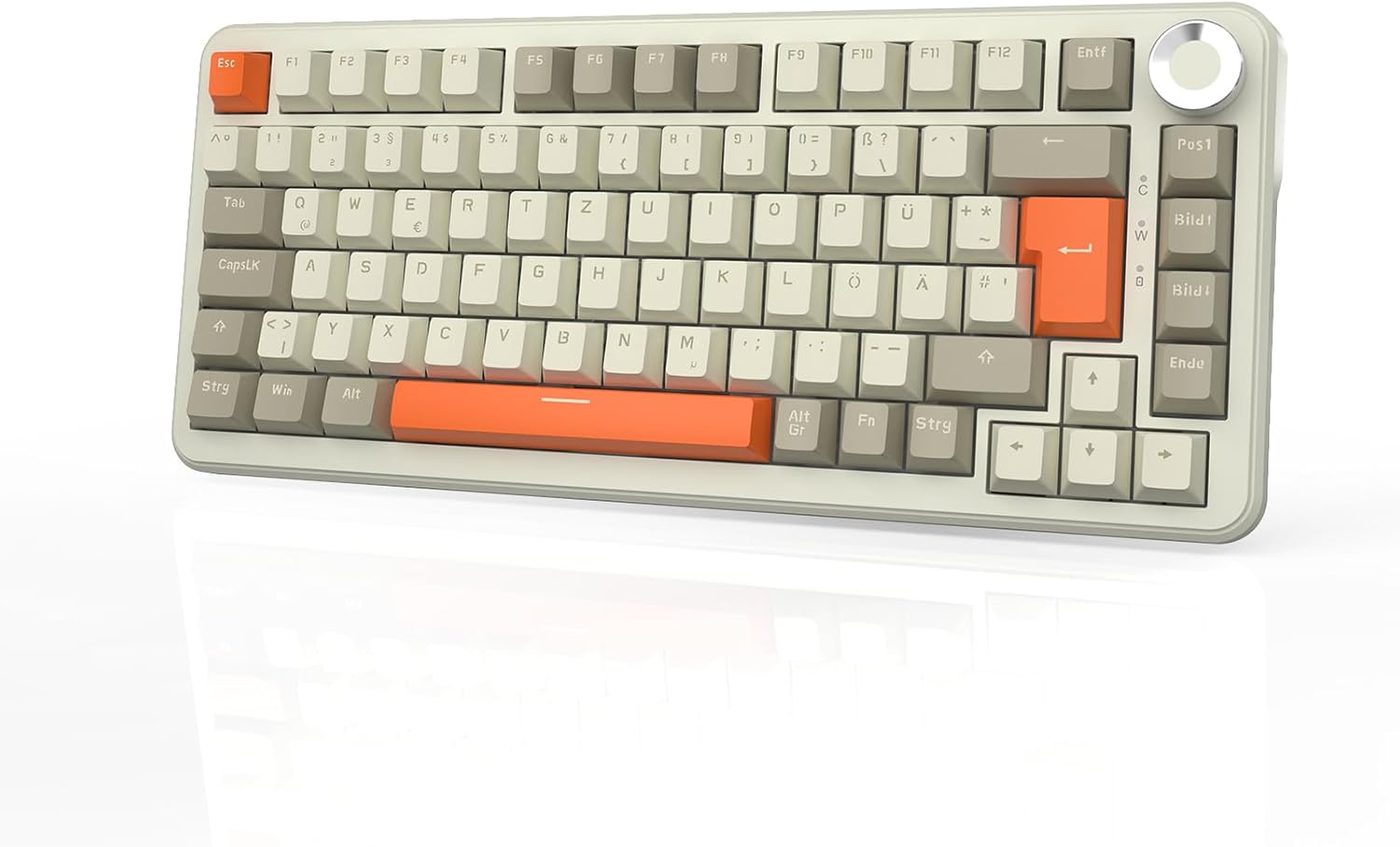
Ajazz AK820 MAX Wireless Mechanical Keyboard, 75% Layout 82-Key Hot-Swap, German QWERTZ
ASIN: B0G4BRKSD5
- ✓8000 mAh battery, twice the capacity of the other wireless keyboards here
- ✓German QWERTZ layout on a compact 75% frame
- ✓Gasket structure with five sound-insulating layers
- ✓PBT keycaps and hot-swap sockets for 3-pin and 5-pin switches
- ✓Metal knob for volume, play and pause, plus an adjustable stand
- Layout
- 75%, 82 keys, QWERTZ
- Connections
- USB, 2.4 GHz, Bluetooth 5.0
- Battery
- 8000 mAh
- Keycaps
- PBT, hot-swap sockets
- Backlight
- RGB, 16 effects, programmable
- Compatibility
- Windows, Mac, Android
Open this product on Amazon
Amazon prices change all the time, so check the current one on the store page. To compare every Amazon store at once, use our browser extension.
Pros
- 8000 mAh cell, the longest reserve between charges of these keyboards
- Owners call the sound pleasant and the keyboard quiet in use
- Switches lift out easily, so trying another feel takes minutes
- Precise metal knob and a plain ISO-DE look without gamer styling
- Cable, dongle and Bluetooth all connect with no delay owners notice
Cons
- The maker's site lists many AK820 variants and the right file is hard to find
- One owner says the software does not always save what he set
- A returned unit had loose keycaps, dry stabilisers and cut out during testing
- Fewer than a hundred ratings, so the quality record is still thin
nacodex AJAZZ AK35I V3 — the full-size mechanical keyboard for people who count
Here the shape changes. The AK35I V3 is a 104-key keyboard with a real number pad, a bank of media keys and a metal volume knob, and it connects with a cable and nothing else. That is a deliberate trade: no battery to charge, no dongle to lose, a USB-C lead that detaches for transport, and a link that never stutters. The case mixes metal and plastic, the keyboard measures 48 cm across and stays where you put it.
The damping recipe matches the compact keyboards: a gasket structure and five layers — sound wool, a PORON sandwich, IXPE pads under the switches and a PET sheet. Hot-swap sockets and three-tone PBT keycaps come as standard. The backlight, though, is a single colour rather than RGB, which is part of why this keyboard undercuts the rest.
Owners like it for the money. One replaced a Logitech G815 and calls the change a clear step up for a fraction of the outlay. Others praise the retro look, the even lighting, the weight, the rubber feet that stop the keyboard sliding, and the puller for cleaning. Two people describe the same limits: the factory switches are dry and audible until you lubricate them, and the keystroke is soft — one buyer with small hands found the spacing wide and the caps slippery, and never got used to it. The supplied cable draws mild criticism as well, though a USB-C lead is easy to replace.
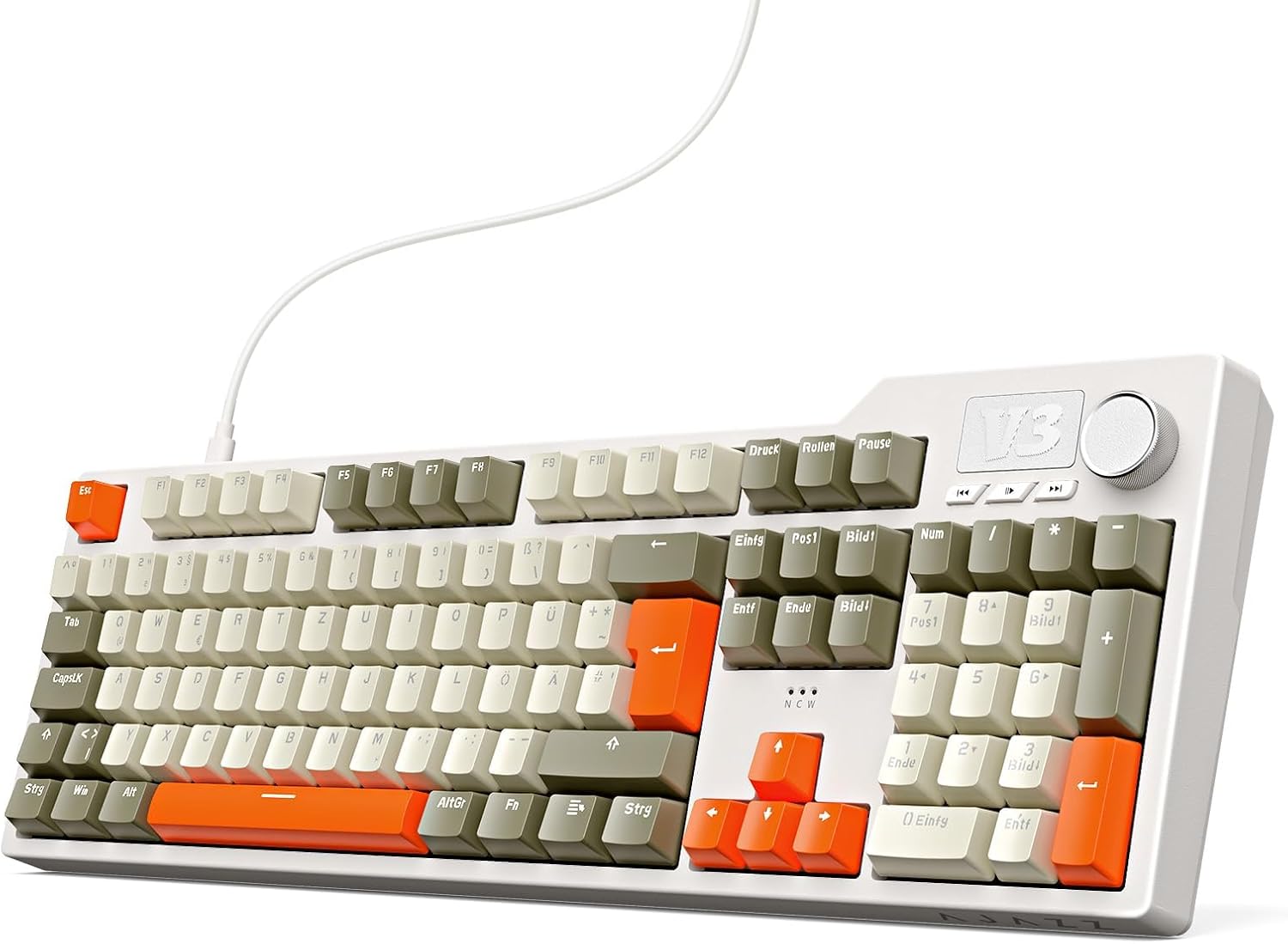
nacodex AJAZZ AK35I V3 Wired Mechanical Keyboard, 104 Keys, German QWERTZ
ASIN: B0G3ZVSGFW
- ✓Full 104-key layout with a proper number pad
- ✓Detachable USB-C cable and plug-and-play setup with no software
- ✓Five damping layers: sound wool, PORON, IXPE pads and a PET sheet
- ✓Metal volume knob alongside separate media keys
- ✓Hot-swap sockets and three-tone PBT keycaps
- Layout
- Full size, 104 keys, QWERTZ
- Connection
- USB-C, detachable cable
- Backlight
- Single colour
- Case
- Metal and plastic
- Dimensions
- 48 × 18 × 6.1 cm
- Warranty
- 1 year
Open this product on Amazon
Amazon prices change all the time, so check the current one on the store page. To compare every Amazon store at once, use our browser extension.
Pros
- Number pad and media keys, with a volume knob beside them
- Cable only: nothing to charge, nothing to pair, no dropouts
- Heavy body and rubber feet keep it still while typing or playing
- Retro three-tone caps and even white lighting that owners like
- Keycap puller in the box makes cleaning and switch swaps easy
Cons
- Factory switches are dry and audible until you lubricate them
- Single-colour backlight instead of RGB
- Wide spacing and slippery caps did not suit a buyer with small hands
- The supplied cable is the weakest part of the package
- One owner wanted more contrast between the legends and the caps
AULA F75 PRO — the 75% keyboard that fixes the dark legends
The F75 PRO answers the loudest complaint in this group. Its PBT keycaps are engraved on the side, so the light leaves through the character itself instead of leaking around the cap, and the legends stay readable when the room is not. The rest reads like a longer version of the same recipe: five padding layers, single-key slotting in the circuit board, pre-lubricated stabilisers and LEOBOG Reaper linear switches in hot-swap sockets.
Connectivity goes a step further than on the other keyboards. This one pairs with up to five devices over Bluetooth 5.0, 2.4 GHz and USB-C, and a side button moves between them, from laptops and phones to tablets and consoles. Gaming details are covered too: N-key rollover, a Windows-key lock, macro programming on every key, and a knob that changes brightness in game mode and volume in office mode. The body is metal and plastic, rated water resistant, and 800 g on a 36 cm frame.
More than three hundred ratings put this keyboard level with the YUNZII at 4.7, and the reviews are short and warm — good sound, good feel, compact design, three connection modes, and software that remaps keys and colours. Buyers in Germany and the Gulf states describe the build as better than they expected. The one recurring gripe is the layout: this is a US QWERTY keyboard, and a German owner wanted the spare caps needed to convert it, since the puller is already in the box. If your language needs QWERTZ, that matters more than any feature on the list.
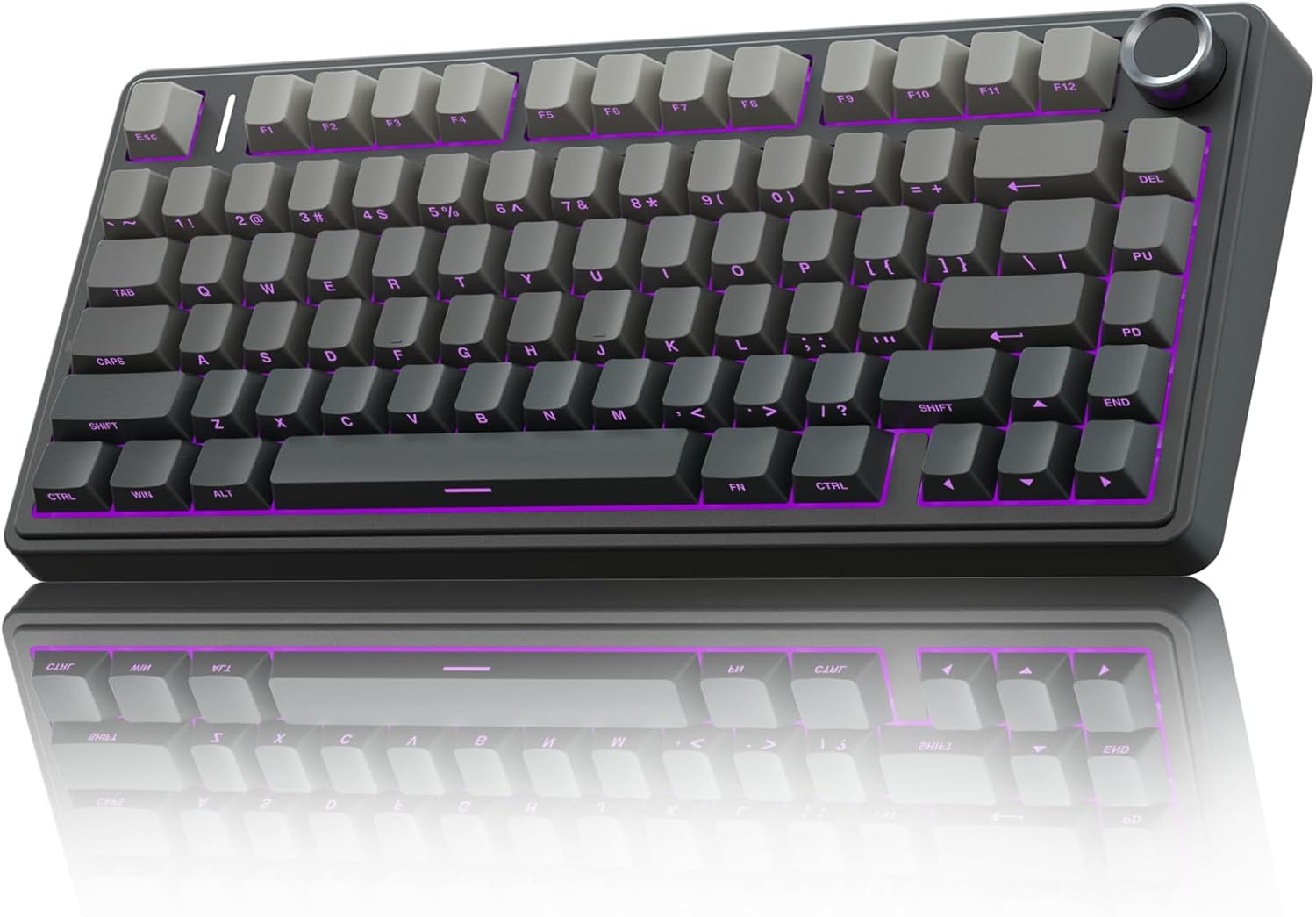
AULA F75 PRO Mechanical Keyboard Gaming, 2.4 GHz/Type-C/BT5.0, Side Engraved, Hot-Swap 75%
ASIN: B0DDT8YRWT
- ✓Side-engraved PBT keycaps let the backlight out through the legends
- ✓Pairs with up to five devices and switches with a side button
- ✓LEOBOG Reaper linear switches and pre-lubricated stabilisers
- ✓N-key rollover and a Windows-key lock for games
- ✓Water-resistant body in metal and plastic
- Layout
- 75%, 81 keys, QWERTY
- Switches
- LEOBOG Reaper, linear, hot-swap
- Connections
- Bluetooth 5.0, 2.4 GHz, USB-C
- Battery
- 4000 mAh
- Dimensions
- 36 × 18 × 5 cm
- Weight
- 800 g
- Warranty
- 12 months
Open this product on Amazon
Amazon prices change all the time, so check the current one on the store page. To compare every Amazon store at once, use our browser extension.
Pros
- Side-engraved caps keep the legends readable in a dark room
- Up to five paired devices, changed with a side button
- Owners describe the sound as creamy and the feel as firm
- Build quality beyond what buyers expected from keyboards at this level
- Software remaps keys and colours without trouble
Cons
- US QWERTY only, and no spare caps for a QWERTZ conversion
- No number pad, like the other two compact keyboards here
- Most reviews are short, so long-term reports are scarce
- Extra keys for other layouts have to be bought separately
Mechanical keyboard comparison by the specifications
Side by side, the four keyboards stop looking alike. Every mechanical keyboard with a knob here uses it a little differently, and that is the small end of a long list of differences.
| Parameter | YUNZII B75 PRO | Ajazz AK820 MAX | nacodex AK35I V3 | AULA F75 PRO |
|---|---|---|---|---|
| Layout | 75%, 82 keys | 75%, 82 keys | Full size, 104 keys | 75%, 81 keys |
| Key language | QWERTY | QWERTZ | QWERTZ | QWERTY |
| Connections | Bluetooth, 2.4 GHz, USB-C | Bluetooth 5.0, 2.4 GHz, USB | USB-C only | Bluetooth 5.0, 2.4 GHz, USB-C |
| Battery | 4000 mAh | 8000 mAh | — | 4000 mAh |
| Hot-swap sockets | Yes, 3-pin and 5-pin | Yes, 3-pin and 5-pin | Yes, 3-pin and 5-pin | Yes, 3-pin and 5-pin |
| Backlight | RGB, 20+ modes | RGB, 16 effects | Single colour | RGB, 16 effects |
| Keycaps | Double-shot | PBT | PBT, three colours | PBT, side engraved |
| Knob | Volume and mode switch | Volume and playback | Volume, plus media keys | Volume and mode switch |
| Case material | Plastic | Plastic | Metal and plastic | Metal and plastic |
| Weight | 0.9 kg | — | — | 0.8 kg |
| Warranty | 12 months | — | 1 year | 12 months |
| Customer rating | 4.7 (1,225) | 4.4 (91) | 4.3 (90) | 4.7 (306) |
Read the last row together with the number beside it. The YUNZII score rests on more than a thousand opinions and the AULA on three hundred, so both have settled. The two keyboards in the middle carry about ninety ratings each, which is enough to show a pattern and not enough to catch a bad batch. That gap matters more than any single specification in the table, because the thing most likely to go wrong with a keyboard at this level is not the design — it is one unit that left the factory badly.
What buyers agree on across all four keyboards
Three findings hold across the review sets of all four keyboards, different as these keyboards are. Sound is the reason people buy these keyboards and the reason they keep them; the word "creamy" appears in German, English and Italian reviews of three different keyboards. Hot-swap is used, not just advertised — owners really do pull switches out of a keyboard to try others or to lubricate them. And nobody in these review sets complains about how these keyboards feel to type on, which says the gasket-and-foam approach works even on the cheapest of them.
The disagreements cluster in the same three places. Backlighting is first: legends that stay dark, light that glares out of the gaps, colours that do not match the box. Software is second — hard to find, thin on features, sometimes forgetful, and rarely available for Linux. Layout is third, and it is the one nobody can fix later. A QWERTY keyboard stays a QWERTY keyboard unless you buy the caps for it.
How to choose a mechanical keyboard
The listings of these keyboards look almost identical, so weigh the six things below instead.
- Decide about the number pad first. It is the one thing a 75% keyboard cannot give back. If you work with figures every day, take the full-size keyboard and accept the desk space it costs; if you mostly write and play, the compact shape leaves room for the mouse.
- Look at the keycaps before the lighting. On these keyboards the legends are printed on top, moulded through or engraved on the side, and that decides what you see at night. All the RGB in the world does not help if the caps block it.
- Treat the battery figure as a real difference. Between 4000 and 8000 mAh there is a real gap in how often you reach for the cable, and a wired keyboard sidesteps the question.
- Check the layout language, not just the layout. Two of these keyboards ship as QWERTZ and two as QWERTY. Software can remap the keys; it cannot reprint them.
- Assume the software will disappoint. Across all four keyboards it is the weakest part of the package. If you plan to live inside macro profiles, search for the download page before you buy, not after.
- Remember that hot-swap makes the switch choice reversible. Dry or too loud from the factory is an annoyance, not a verdict, on any keyboard with these sockets — a set of switches and half an hour will change the whole feel.
Frequently asked questions
- What does a 75% keyboard leave out?
- The number pad, and little else. The arrow keys and the function row stay, so the keyboard keeps 81 or 82 keys instead of 104 and gives back a hand's width of desk.
- What is hot-swap and do I need it?
- Hot-swap sockets let you pull a switch out and push another one in without soldering. All four keyboards here have them, so the typing feel is a choice you can change later, not a decision fixed at purchase.
- Why do these keyboards have five layers of foam inside?
- The layers fill the air gaps between the circuit board, the mounting plate and the switches. Without them a keyboard case rings hollow on every keystroke; with them the sound is lower and shorter.
- Are the legends lit on all of them?
- No, and this is the clearest difference between these keyboards. The AULA uses side-engraved caps, so the light comes out through the character. Owners of the YUNZII report that its caps stay dark while light escapes between the keys. The nacodex has a single-colour backlight.
- Does a wireless keyboard feel slower than a wired one?
- Buyers of the wireless keyboards here report no delay they can notice over either Bluetooth or the 2.4 GHz dongle. A cable still removes the question completely, which is one argument for the full-size keyboard.
- QWERTY or QWERTZ — how much does it matter?
- It matters if you write in German and touch-type by sight. Remapping in software moves the keys, but the printed characters stay wrong. Two of these keyboards are QWERTZ and two are QWERTY, so check the listings of these keyboards carefully.
Verdict
Every model on the same criteria
Score against price
- YUNZII B75 PRO4.4 at about €76
- Ajazz AK820 MAX4.2 at about €74
- nacodex AK35I V34.1 at about €85
- AULA F75 PRO4.6 at about €89
The overall score divided by the typical price, with the best in the group as the full bar. A rough guide, not a verdict — a cheap model that misses the feature you need is no bargain.
Read the bars as trade-offs, not as a ranking. Every keyboard here loses something to gain something else: the keyboard with the best sound has the worst legends, the keyboard with the biggest battery has the thinnest quality record, the one with the number pad gives up wireless and colour, and the one that lights its characters properly comes in a single key language. None of the four keyboards is weak — all of them sit at 4.3 or higher on Amazon, and nobody in these review sets complains about how any of them types.
So start from the two things you cannot change once the box is open: the layout and the legends. Count whether your work needs a number pad, decide whether you will ever type in the dark, and check which key language the listing actually ships. Those answers usually cut this list in half. Everything after them — the switches, the sound, the lighting modes — can be changed later on all four of these keyboards, because every one of them has hot-swap sockets.