What matters in a gaming mouse: weight, buttons and battery, not DPI
Gaming mice under €200
Every gaming mouse listing opens with a sensor figure: 19,000 DPI, 26,000, 30,000. Those numbers passed the limits of a human hand years ago. The specifications that change how a game feels sit lower on the page, in smaller type — how many grams the gaming mouse weighs, how many buttons the thumb can reach, whether a cable stays attached, and how long the battery lasts before the mouse dies in the middle of a game.
Those four things pull against each other. A gaming mouse loses weight by dropping buttons and hollowing out its shell. It gains buttons by growing heavy enough to feel when you swing it. A cable ends the battery question and adds a tether. No single model wins all four arguments, so the category splits into shapes that barely look related: a 49 g skeleton for fast games, a 12-button block for games where the keyboard is already full.
This gaming mouse comparison lines up four models sold across the Amazon stores: the wireless Turtle Beach Kone XP Air with its charging dock, the 49 g MelGeek Horus, the ASUS ROG Spatha X built for MMO games, and the wired Turtle Beach Kone II. None of them is the reference point for the other three. They sit in the same class — in most stores each one stays under $170, and the group sits near $120 — so the question is not budget but which trade-off you are willing to make. Every specification comes from the listings, and every opinion from people who bought these gaming mice.
Models in this comparison
Typical price across these models: about €118. Rough figures from store prices converted at fixed rates: what you pay also depends on the store and the region you order from. With our browser extension you can compare every Amazon store at once, right on the product page.
Turtle Beach Kone XP Air, the wireless gaming mouse with a charging dock
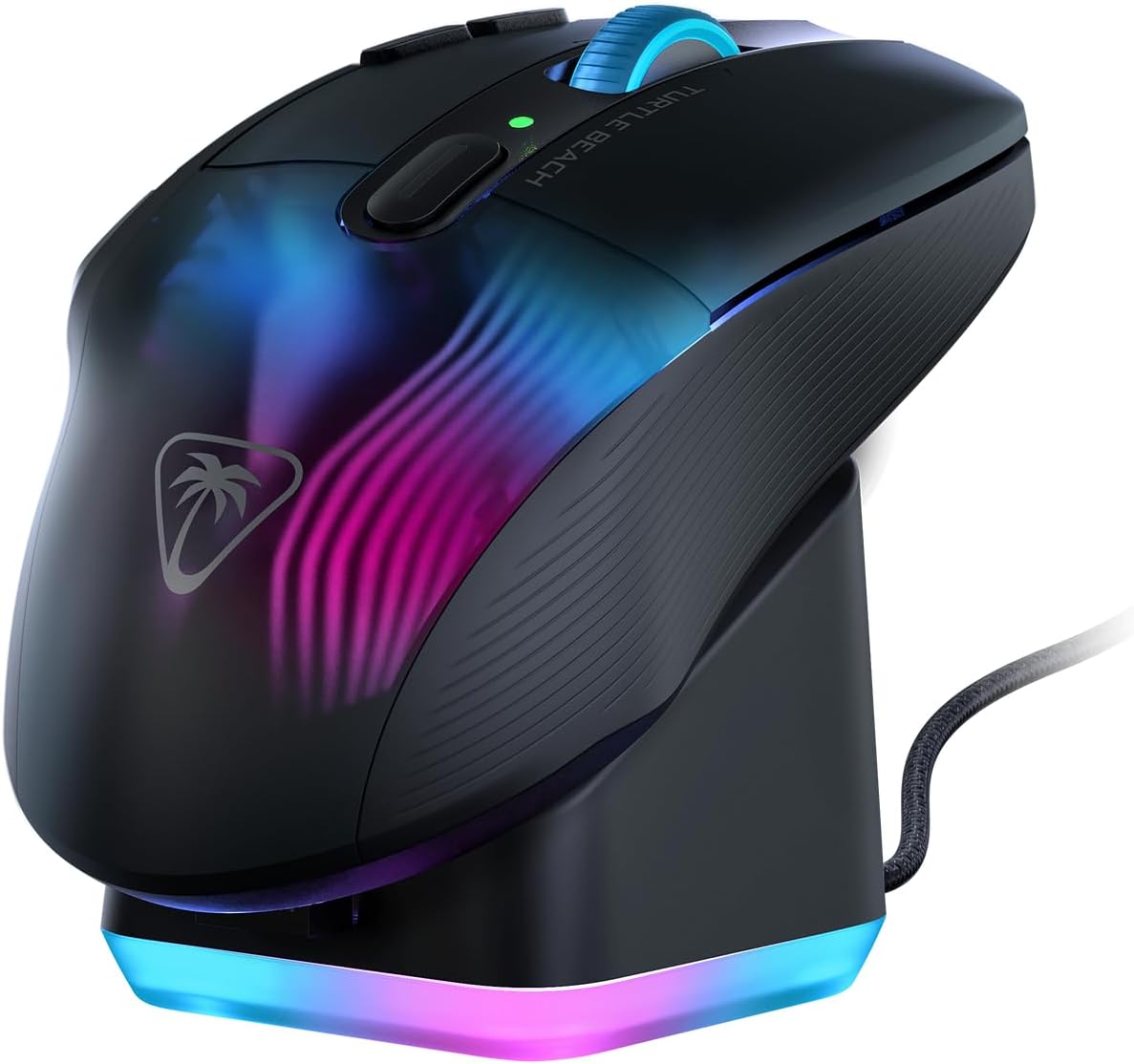
Turtle Beach Kone XP Air Wireless Gaming Mouse, 2.4 GHz/Bluetooth, Black/Black, Optical, 19K Optical, Multi-Button, 3.5 oz (99 g), Charging Dock, Reflex RGB
ASIN: B0D1CTCP8D
- ✓29 programmable inputs and a 4D wheel that tilts as well as scrolls
- ✓Low-latency 2.4 GHz link plus Bluetooth for a second device
- ✓Charging dock in the box, so the mouse tops up between sessions
- ✓Up to 100 hours on a charge
- ✓Kone shape, built around the palm rather than around the sensor
- Connection
- 2.4 GHz wireless, Bluetooth
- Sensor
- 19K optical
- Inputs
- 29 programmable
- Weight
- 99 g
- Dimensions
- 12.6 × 7.19 × 4.01 cm
- Battery
- Up to 100 hours
- Released
- June 2024
The Kone XP Air sits in the broad middle of the category: a wireless mouse with more buttons than a shooter game needs and less weight than an MMO mouse carries. Turtle Beach counts 29 programmable inputs, including the tilting 4D wheel and a button under the thumb rest. Its 19K optical sensor is the most modest figure in this group, and not one owner writing about this gaming mouse mentions the sensor — a fair sign of where the real differences live.
Two features separate it. The first is dual wireless: a low-latency 2.4 GHz receiver for the game, Bluetooth for a laptop, and a battery rated at up to 100 hours. The second is the charging dock, which turns charging into putting the mouse down. At 99 g this is the heaviest of the wireless gaming mice here, and the weight shows up in the reviews on both sides.
The praise is about the hand, not the numbers. Buyers in Germany, France and Japan describe the same thing: the shape supports the palm through a long game without fatigue, the buttons sit where the fingers already are, and the 2.4 GHz link holds with no delay anyone can feel. One Japanese owner moved from a cheap gaming mouse to this one to stop reaching for the keyboard in a game, mapped the thumb-rest button to the pick-up key, and rates the clicks far above the older mouse. The dock earns steady thanks from people who never remember to plug in a cable.
The complaints cluster in two places. Software is the loud one: the Swarm II app crashed repeatedly for a buyer whose macros never fired, and a Swedish owner keeps a backup of every profile because settings vanish on their own. The second is weight and charge. Owners arriving from lighter gaming mice call this one heavy — fine for role-playing games, questionable for anything decided in a fraction of a second. One owner reports a charge lasting about a day; another found that a knock on the desk wakes the mouse on its dock, so the lights come on and the battery drains unseen. One buyer lost the scroll wheel after four months.
Pros
- Shape holds up through long sessions, reported from three countries
- Thumb-rest button is genuinely easy to reach mid-game
- 2.4 GHz link stays stable with no delay owners can feel
- Charging dock removes the daily search for a cable
- Click feel rated well above cheaper models by an owner who switched
Cons
- Swarm II software crashes for some owners and forgets saved profiles
- Heavy next to the lighter mice buyers arrive from
- Wakes on desk vibration while docked and quietly loses charge
- One owner reports a charge lasting only about a day
- One scroll wheel failed after four months
This gaming mouse suits long sessions of role-playing, strategy or simulation games, if you want buttons under the thumb and would rather drop a mouse on a dock than plug it in. Anyone chasing the fastest aim in a shooter game, or unwilling to fight configuration software, is better served by one of the other three gaming mice.
Grams before DPI: what weight does in a game
These four gaming mice run from 49 g to a body buyers call properly heavy, and that range does more to the feel of a game than any sensor specification. A lightweight gaming mouse is moved by the fingers; a heavy one is moved by the forearm. Owners of the 49 g MelGeek say aim stops costing effort and the wrist survives long shooter games. Owners of the ASUS say the mass steadies the hand in a long game and that they would not go back.
Both camps are right, because they play different games. Weight is dead load in a shooter game, where every flick is a fresh movement. In an MMO game or a simulation the hand mostly rests and presses buttons, and there a mouse that stays where you left it beats one that skates at a breath. An owner of the Kone XP Air puts it plainly: this mouse feels heavy after a lighter one, and that steadiness is what makes a long game comfortable. Grams are not free either way.
MelGeek Horus, the lightweight gaming mouse for fast games
This is the extreme end of the category: a mouse built for one kind of game. The Horus weighs 49 g, about half the Kone XP Air, and gets there with a skeleton underside you can see through. The sensor is a PAW3950 running from 400 to 30,000 DPI with five presets on a button underneath, and the polling rate reaches 8,000 Hz. There is no Bluetooth: this mouse connects through a 2.4 GHz receiver or a USB-C cable, and nothing else. Battery life is quoted as up to 215 hours, which the listing breaks down as about 155 hours at 1,000 Hz and 18 hours at the full 8,000 Hz.
The receiver is the oddity: a translucent pyramid that sits on the desk and shows DPI, polling rate and battery level in coloured light. MelGeek's HIVE settings page opens in a browser instead of an installed program, which owners like. The box also holds spare PTFE skates, grip tape and a sticker that seals the hollow underside against dust.
Buyers in Japan and the United States describe the same shock at the weight, then a gaming mouse that glides smoothly, tracks without delay and fits a medium to large palm better than its plain shape suggests. One American owner who set out to buy a big-name brand calls it the lightest mouse he has held. The scroll wheel is quiet with real resistance, and the clicks are light but not flimsy.
The reservations are practical. No Bluetooth means one USB port stays occupied, which matters on a laptop. The matte shell shows finger marks and turns slick when the hand warms up, and the hollow base lets dust in. Six buttons leave little to remap beyond the two on the side, so games with long keybind lists are not this mouse's ground. One Japanese reviewer, positive about everything else, is unsure it is worth the money. With 36 ratings, it has the smallest crowd of these four gaming mice.
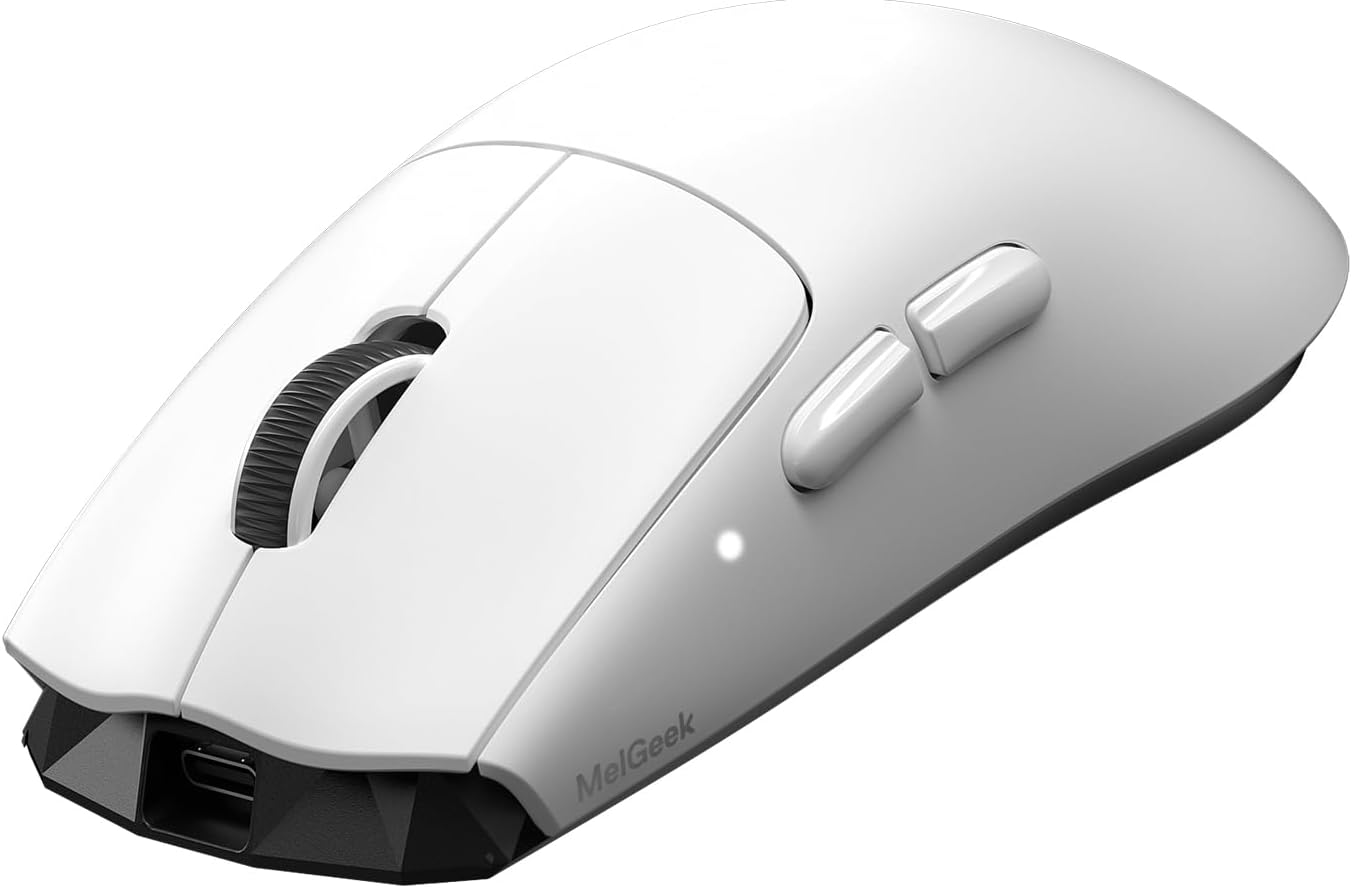
MelGeek Horus Ultralight Wireless Gaming Mouse 49g 30K DPI 8K Polling 215 Hours Playtime 2.4G/USB-C White
ASIN: B0GH1JHPTP
- ✓49 g, the lightest body in this comparison by a wide margin
- ✓PAW3950 sensor, 400 to 30,000 DPI, five presets on a bottom button
- ✓8,000 Hz polling rate over the 2.4 GHz receiver
- ✓Set up in a browser through HIVE, with nothing to install
- ✓Spare PTFE skates, grip tape and dust seals in the box
- Connection
- 2.4 GHz receiver, USB-C wired (no Bluetooth)
- Sensor
- PAW3950, up to 30,000 DPI
- Polling rate
- Up to 8,000 Hz
- Buttons
- 6
- Weight
- 49 g
- Battery
- 300 mAh, up to 215 hours claimed
Open this product on Amazon
Amazon prices change all the time, so check the current one on the store page. To compare every Amazon store at once, use our browser extension.
ASUS ROG Spatha X, the MMO gaming mouse with twelve buttons
The Spatha X goes the other way. It carries 12 programmable buttons, a 19,000 DPI sensor, a 1,000 Hz polling rate in wired and 2.4 GHz modes alike, and up to 67 hours of battery with the lighting off. The detail that sets this mouse apart is under the shell: the switches sit in push-fit sockets, so a worn switch is replaced rather than ending the life of the mouse.
It has the largest audience of these gaming mice by far — 1,947 ratings — and the reviews read like long-term reports. A British buyer with small hands says the side buttons sit far enough back to reach, which most large gaming mice get wrong, and calls the swappable switches an idea more makers should copy. An Australian owner with big hands moved off a mouse that caused arm pain and found the size right. A Japanese owner is on a third unit in four years, uses it for CAD and spreadsheets rather than games, and praises the magnetic dock that never misses the contacts.
The same long view produces the sharpest criticism. Two owners report the scroll-wheel click failing, after a year or two in one case and three months in another. The heaviest complaint is the weight: pressing a side button can shift the whole mouse, so fast games are not its ground. The side buttons are stiff. Armoury Crate is called unintuitive, and one owner had to remove it with the maker's own uninstaller before a second unit would take macros. Leave the RGB on and the battery falls from three or four days to overnight charging.
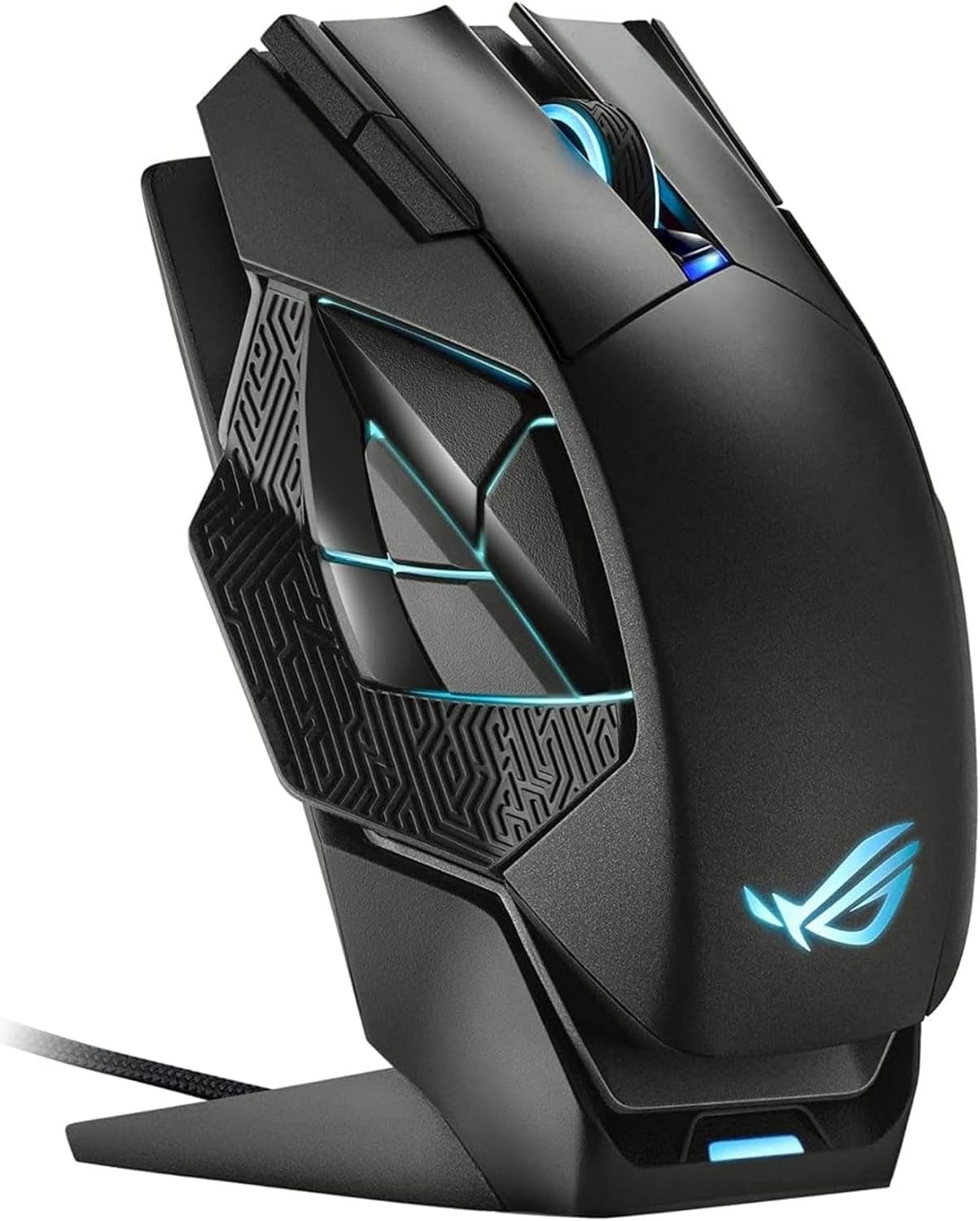
ASUSTek ROG Spatha X MMO Wireless Gaming Mouse, 19,000dpi, 12 Programmable Buttons, Dual Mode Connection, Up to 67 Hours, ROG Micro Switches, RGB
ASIN: B09726KT4R
- ✓12 programmable buttons for games where the keyboard is already full
- ✓Wired or 2.4 GHz, both running at a 1,000 Hz polling rate
- ✓Push-fit switch sockets: worn switches come out and get replaced
- ✓Up to 67 hours of battery with the lighting off
- ✓Magnetic charging dock that owners say never misses
- Connection
- 2.4 GHz wireless, wired
- Sensor
- 19,000 DPI optical
- Buttons
- 12 programmable
- Polling rate
- 1,000 Hz in both modes
- Battery
- Up to 67 hours, lighting off
- Dimensions
- 13.7 × 8.9 cm
- Warranty
- 1 year
Turtle Beach Kone II, the wired gaming mouse of the group
The Kone II shares the shape family of the Kone XP Air, arrived five months later, and swaps the battery for a PhantomFlex braided cable. Losing the cell drops the weight to 90.7 g and removes charging from your life. In exchange the sensor improves: an OWL-EYE optical unit at 26K DPI and 650 IPS against the 19K of the wireless model, with the same tilting 4D wheel and 23 customisable inputs.
This is the better-but-cheaper case of the group. It rates 4.3 across 467 ratings against 3.9 across 344 for the wireless gaming mouse it descends from, and it asks less in every store. Buyers single out the button under the thumb rest. One Japanese owner says that single well-placed button is reason enough to choose this mouse, and cannot understand why other makers ignore the idea. Another switched from a Razer Basilisk, kept it, and only warns about the size. An American owner's whole complaint is that it took too long to find.
Not everyone gets on with it. The body is a size up from most gaming mice, and two owners flag it: the clicks feel heavy and smaller hands should try one first. A buyer who came from a ROCCAT mouse found this one hollow and cheap-feeling and is shopping again, and an Italian owner reports dim lighting. The configuration software gets the same shrug as on the wireless model — workable, but the old ROCCAT app was clearer.
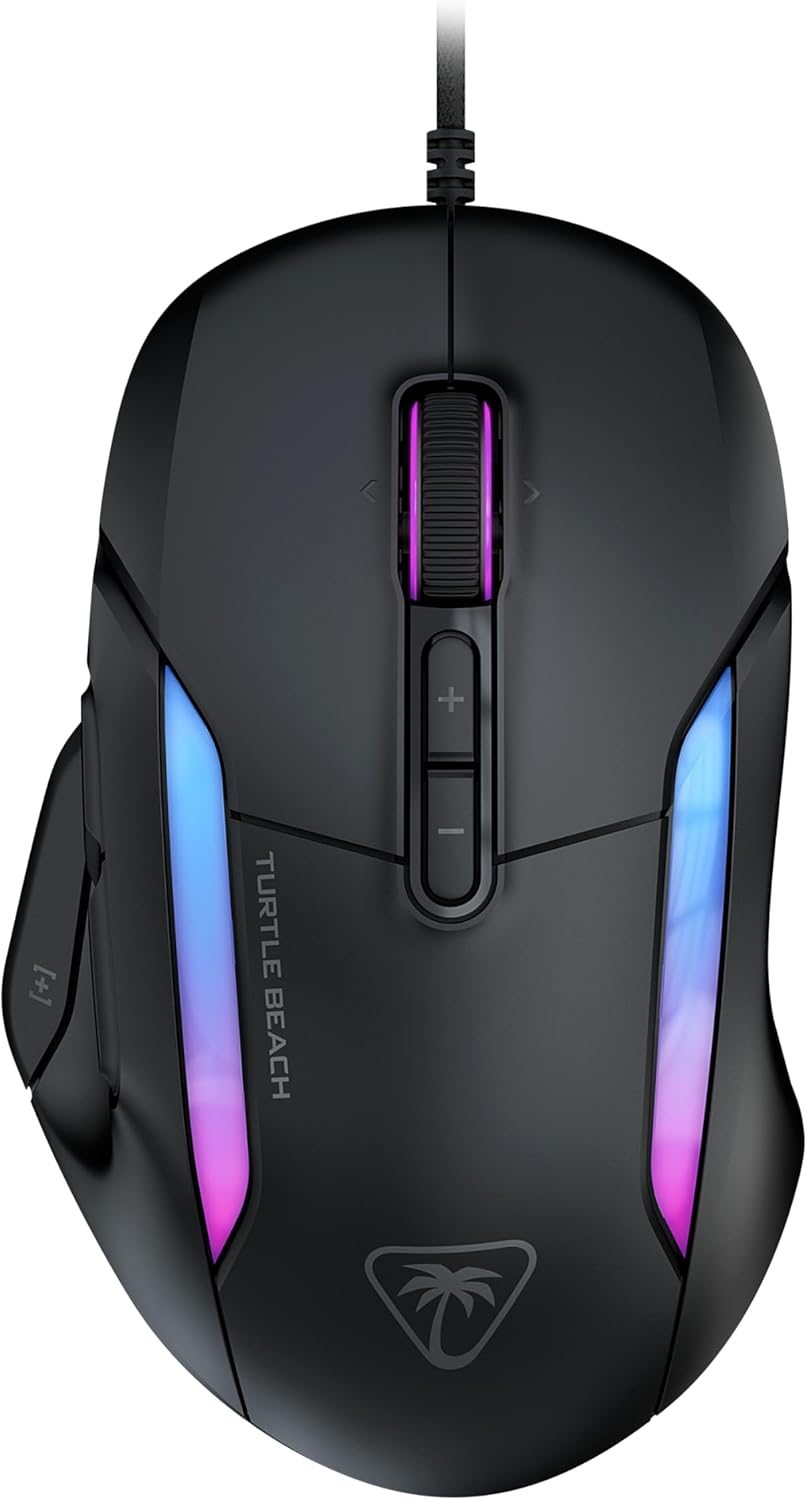
TURTLE BEACH Kone II Gaming Mouse, Black, Multi-Button, Wired USB, 26K DPI Sensor, 650 IPS for MMO/RTS, Macro Function, Ergonomic, 4D Scroll Wheel, Ash Black
ASIN: B0D9MC8JYD
- ✓26K DPI OWL-EYE sensor at 650 IPS, the sharpest figures in this group
- ✓23 customisable inputs, 21 of them programmable
- ✓Button under the thumb rest that owners rate above every other feature
- ✓PhantomFlex braided cable that does not tangle
- ✓90.7 g with no battery to charge or forget
- Connection
- Wired USB-A
- Sensor
- OWL-EYE optical, 26K DPI, 650 IPS
- Inputs
- 23 customisable, 21 programmable
- Switches
- Optical
- Weight
- 90.7 g
- Dimensions
- 13.03 × 8.26 × 4.32 cm
- Released
- November 2024
Gaming mouse comparison by the specifications
Side by side, these gaming mice stop looking like variations on one product.
| Parameter | Kone XP Air | MelGeek Horus | ROG Spatha X | Kone II |
|---|---|---|---|---|
| Connection | 2.4 GHz, Bluetooth | 2.4 GHz, USB-C | 2.4 GHz, wired | Wired USB-A |
| Weight | 99 g | 49 g | — | 90.7 g |
| Sensor | 19K optical | PAW3950, 30,000 DPI | 19,000 DPI optical | OWL-EYE, 26K DPI |
| Polling rate | — | Up to 8,000 Hz | 1,000 Hz | — |
| Buttons and inputs | 29 programmable | 6 buttons | 12 programmable | 23 inputs, 21 programmable |
| Battery | Up to 100 hours | Up to 215 hours claimed | Up to 67 hours, lighting off | — |
| Charging dock | Included | — | Included | — |
| Warranty | — | — | 1 year | — |
| Customer rating | 3.9 (344) | 4.7 (36) | 4.0 (1,947) | 4.3 (467) |
Read the bottom row with the number in brackets. The Spatha X score rests on nearly two thousand opinions and has settled; the Kone II on several hundred. The 4.7 beside the MelGeek comes from 36 people — enough to show a pattern, not enough to catch a bad batch. That gap matters more than any figure above it, because on gaming mice at this level the thing most likely to go wrong is not the design. It is one unit that left the factory badly.
What buyers agree on across these gaming mice
Three findings hold across all four review sets. The first: nobody argues about sensors. Not one owner of these gaming mice praises or blames DPI, and the model with the lowest figure on paper collects the warmest words about how it tracks in a game. The second: inside a game, placement beats count. The loudest praise in this comparison goes to a single button under a thumb rest, on the cheapest gaming mouse here.
The third is software, the weak point of the category. Swarm II crashes and loses profiles. Armoury Crate needs a special uninstaller before it behaves. Only MelGeek's browser page escapes criticism, and it escapes because it does almost nothing. If your plan involves macros inside a game, look at the maker's app before you order.
Hardware faults across these gaming mice land on one part: scroll wheels stopped working on the Kone XP Air and on two ASUS units, and nothing else in these review sets fails twice.
How to choose a gaming mouse
The listings of these gaming mice all promise precision, so weigh these six things instead.
- Start with the games you actually play. Shooters reward lightweight gaming mice and punish mass, while an MMO game or a simulation rewards buttons and a body that stays put. Buying against your own game library is the one mistake nothing else fixes.
- Treat weight as a hard specification, not a taste. The distance from 49 g to 99 g is the widest real gap between these gaming mice, and a game feels different at each end.
- Count the buttons you will reach, not the ones on the box. Twelve inputs help only if the thumb finds them without shifting the mouse — and on the ROG Spatha X, owners say pressing one moves the whole body.
- Decide about the cable honestly. Wired gaming mice never run flat and cost less for the same sensor. Quoted gaming mouse battery life ranges from 67 to 215 hours here, but a dock is what really removes the question — as long as the mouse lands on it after the last game of the evening.
- Check your hand against the shape. Three of these gaming mice are built for medium to large palms, and the reviews carry warnings from buyers whose hands did not match.
- Assume the software will disappoint. On every mouse here it is the least reliable part of the purchase, so save your profiles.
Frequently asked questions
- Does a higher DPI make a gaming mouse better?
- No. The four gaming mice here run from 19,000 to 30,000 DPI, and none of the owners writing about them mention the sensor as a strength or a weakness. Most people play far below those numbers.
- Is 49 g too light for everyday use?
- It depends on the hand. Owners of the MelGeek Horus describe less wrist fatigue during long shooter sessions, but the shell is smooth and can slip in a dry hand, which is why grip tape ships in the box.
- Does a wireless gaming mouse feel slower than a wired one?
- Buyers of the wireless models here report no delay they can notice over the 2.4 GHz receivers. A cable removes the question completely and also removes the battery, which is one argument for the wired Kone II.
- What is an 8,000 Hz polling rate worth?
- It is how often the mouse reports its position. The MelGeek Horus offers 8,000 Hz, the ASUS 1,000 Hz. The listing for the MelGeek notes that the fastest setting cuts battery life from about 155 hours to 18.
- Which of these gaming mice suits large hands?
- The Kone XP Air, the Kone II and the ROG Spatha X are all built around a large palm, and owners with big hands say so directly. Buyers with smaller hands report that the Kone II feels a size too big.
- Can a broken switch be repaired?
- On the ROG Spatha X, yes: the switches sit in push-fit sockets and come out. On the other three, a failed switch means a repair or a replacement, and scroll wheels are what owners report failing.
Verdict
Every model on the same criteria
Score against price
- Kone XP Air3.9 at about €130
- ROG Spatha X4.0 at about €165
- Kone II4.4 at about €60
The overall score divided by the typical price, with the best in the group as the full bar. A rough guide, not a verdict — a cheap model that misses the feature you need is no bargain.
Read the bars as trade-offs, not as a ranking, because no gaming mouse here leads every row. The two wireless models with the most buttons score worst on the software that configures them, and both give up speed for the mass their shells carry. The lightest body wins the fast games and loses everything that needs a thumb. The wired model avoids the battery argument entirely and takes the sharpest sensor of the four with it, at the cost of a tether and a shell some owners find hollow.
So pick the shape first and the weight second; the sensor will be good enough whichever way you go. Count the keys your usual game asks the thumb to reach, decide whether you will ever put a mouse back on a dock, and only then compare what each store charges — two of those answers already remove half of this list.